Foreword
If you've seen me around the interwebs, you kinda know, that I like to build stuff.
Especially in the creative fields. I love making things pretty, even though I'm no designer.
Thus, I come to the conclusion that I'd code the arts I love. Let my mind be free, as in coding/programming - whichever you prefer. Yet, still be making arts.
On twitter, for example, I've made a simple bot, that travels to the outer space, finds a tree. Takes a picture of said tree and posts it back to the twitter user, whom requested it. This only costs a fraction of my server to keep up, so I've decided to price it with a tweet. You simply ask for a tree, give it a few moments and boom! Ya got yourself a beautiful tree! This magnificent little traveler, is simply called @TreesFromSpace.
Anyhow, what I'm trying to say, is that I love the creative side of programming. TreesFromSpace for instance is a fully automated bot, made in a simple node-script which calls yet another simple program in openRNDR.
What
You might be wondering, what is a sketch? The answer is simple, in the world of creative coders, a sketch is known as a piece of processing.
As I like the arts, I've decided to try to implement one of these so-called sketches on MaWeCo. Sounds easy, right? Well. I don't know? I've decided to run my site on Hugo where every post is written in Markdown, these files can be known by their extension: md.
As posts are written in markdown, how does one add a sketch? Well, follow along, and the answer shall reveal it-self!
Uhm?
First of all, both openRNDR and processing are their own languages, by that I mean, openRNDR is written in kotlin, and processing is written in Java. Ever since the early days of the interwebs, Java as been along and had their own ways of embedding a Java-program into a site, namely known as applet's. Though, we're in the 2019 now, soon to be overtaken by 2020, and these applet's have died long ago.
So, what now? Fear not! We're in the beautiful hands of JavaScript, they've got you covered, for the fine guys of the processing world has bought to you, a library best known as p5.js. This is a simple implementation of processing in js. Yet again, we're back at, how does one add this to a markdown-page? It's easier than you might think!
Okay, enough characters, let's get started!
Scripting
Let's add the p5.js to the theme of Hugo.
In the themes-dir you'd be able to find a file called single.html, this is responsible for serving a single post. For this, you'd either download the p5-library, and place it in the static's directory, or simply get it served by cloudflare as they suggest. I'll be downloading it though.
Now, let's create a shortcode for this.
Hello, Canvas!
Now for the more interesting part. Adding a canvas, or not just adding a canvas, but adding a canvas to the proper location of the post.
This can be done using a custom shortcode, and, as canvases aren't supposed to be used in a post, we'll have to create our own shortcode. Well, who cares? It's more fun this way, anyway!
So, within the layouts-folder, you'd either have already have a shortcodes-folder, or create one. Next, add a new html-file and call it: sketch.html.
Let's add the p5-lib to our shortcode:
|
|
As for now, it's quite boring. Does absolutely nothing, except adds the p5-library. So, let's spice it up!
|
|
Now, that's actually the whole shortcode.
Try adding it like:
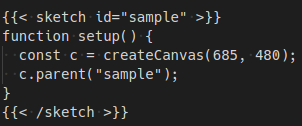
Sketch usage
Apparently I can't highlight a shortcode within the highlight shortcode 🤷♂
Anyhow, let's make something more exciting, than an empty sketch. So, let's add a background like so.
|
|
Simple! Take a look at the results below.
That's all! Now, onward! Show off those beautiful sketches you've got!
- Thanks,
Mads Cordes